
Online Learning Resources
TECH SUPPORT: 580-956-8228
Device technology support: [email protected]
Educational Technology support: [email protected]
Click the link to view Points of Contact
Click the link to view Virtual Expectations
Log in to Student Email Account
To log into Clever without a badge, go to the Clever site Clever log in
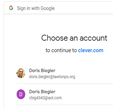
Log in with Google
This will ask you to pick your student email address
Then it might ask for your password, that would be your student ID number followed by an Uppercase first letter of your first name and then a lowercase first letter of your last name. Example 123456Fg